
CookEase is free to use, and a free account is the whole app, not a preview. The only thing that is counted is adding a new recipe to your cookbook, whether you save it or your Recipe Crafter makes it for you. Here is exactly what you get, and what happens when you run out.
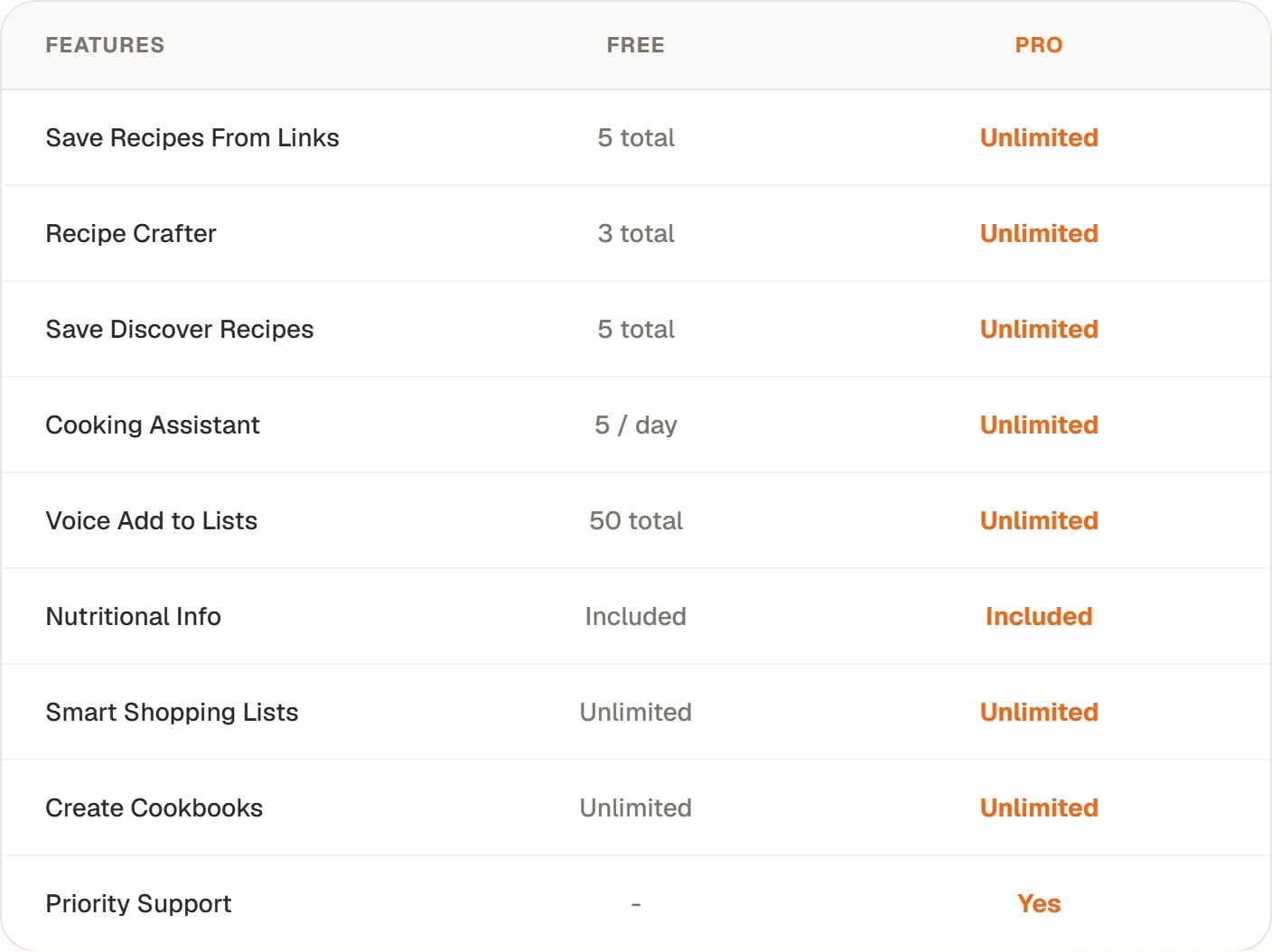
The same table appears on the Upgrade page on the website and in the app.
What a free account includes
Every new account starts with 5 free saves. It is a one-time allowance: it does not reset each day or each month, and it grows when you invite friends. One count covers everything that adds a new recipe to your cookbook:
- Every kind of save. A link, a share from TikTok, Instagram or YouTube, a photo or PDF, pasted text, or someone else's recipe from Discover, a creator page or a shared recipe link. Each recipe you save counts as one.
- Every new Recipe Crafter recipe. Each recipe the Recipe Crafter makes for you uses one free save.
Already saved some recipes before every kind of save moved to one count? Those saves count toward the 5, so you have whatever is left of it. Had Recipe Crafter recipes left from before the Recipe Crafter started using free saves? They were added to your free saves, so you can use them to save or to create.
Always free, with no limit
- Opening, cooking and scaling every recipe you have saved.
- Asking the Cooking Assistant questions while you cook, spoken or typed.
- Editing recipes and organizing them into cookbooks.
- Shopping lists built from your recipes, typed in or said out loud.
- Pantry photos in your Recipe Crafter, so it can see what you have.
- Ordering your groceries from Instacart or Amazon Fresh.
- Planning meals in Meal Plan by hand, with reminders, one grocery list for the week and sharing.
- My Cookie Jar, your cooking stats and stamps.
- Nutrition for every recipe, and sharing recipes with anyone.
Unlimited means normal personal use. To keep CookEase fast for everyone there are automatic daily safeguards, set far above what anyone cooking at home needs, as section 13 of the Terms of Service explains.
Plan my week
In Meal Plan, Plan my week picks a week of dinners for you (breakfast, lunch and snacks you add yourself). Your first planned week is free, and every friend who joins with your invite adds one more. After that, Plan my week is part of Pro. Planning by hand never counts.
See how many you have left
Open Save a Recipe (the Save a recipe button in your Cookbook on the website, or the orange + button and then Save a Recipe in the app). Once you have 2 or fewer saves left, the bar at the top shows how many, like 2 saves left, with a dot for each save. Tap the count, there or on the Recipe Saved! screen right after a save, to see the ways to keep saving: Pro, inviting a friend and, in the app, watching short videos. CookEase shows the same count wherever you save a recipe, including Discover, creator pages, shared recipes and your Recipe Crafter, and it is the same number everywhere because every save, and every new Recipe Crafter recipe, uses the same 5.
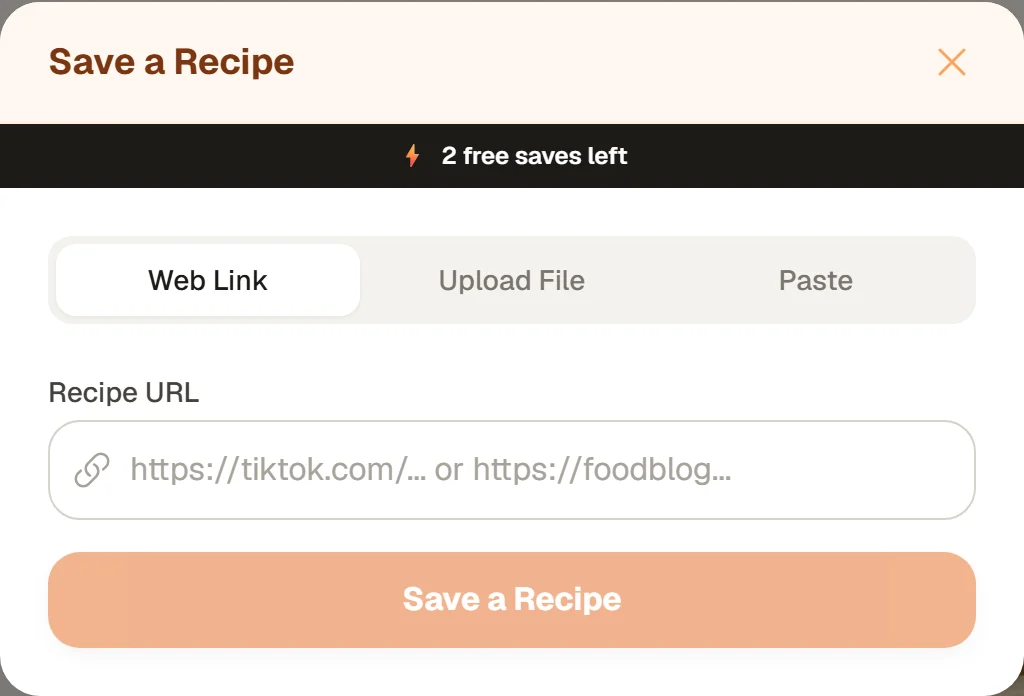
On the website: the bar above the Web Link, Upload File and Paste tabs.
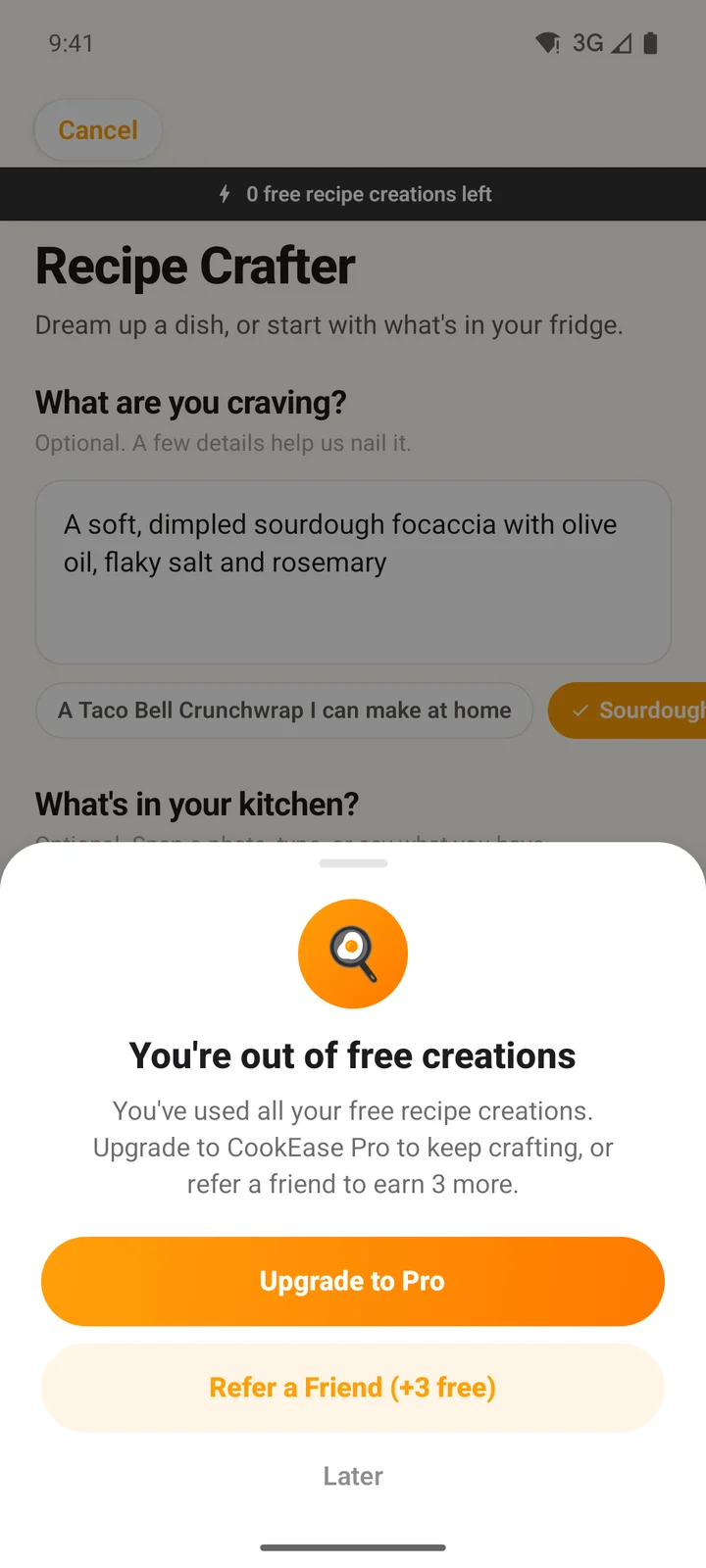
In the app: the sheet you see in your Recipe Crafter once your free saves run out.
Get more for free
- 1
Invite a friend
Every friend who joins with your invite link or code adds 10 free saves. There is no cap, the extras never expire, and they apply on their own. Find your link at Invite friends in the website's account menu or the app's More screen. See refer a friend. - 2
Watch 2 short videos (in the app)
In the iPhone and Android apps, the out-of-saves sheet offers Watch 2 short videos. Watch both to the end and you get 1 free save. It is up to you: nobody sees a video unless they choose to. See get a free save by watching videos. - 3
Use a creator code
If you found CookEase through a creator's video, their code adds 10 extra free saves, in the same count. Each account can use one code. See creator codes. - 4
Or go unlimited with Pro
Pro gives you unlimited saves and unlimited Recipe Crafter recipes, and starts with a 7-day free trial for first-time subscribers. Plans and prices are in plans, billing and subscriptions.
Get a free save by watching videos
In the iPhone and Android apps, you can earn a free save by watching 2 short videos whenever you run out. It is completely optional: CookEase never plays a video unless you choose to, and there are no ads anywhere else in CookEase. One save covers one recipe, whether you save it or your Recipe Crafter makes it.
- 1
Run out of free saves
Try to save a recipe (a link, a share, a Discover or creator recipe, a shared recipe) or craft one in your Recipe Crafter. The out-of-saves sheet slides up. - 2
Tap Watch 2 short videos
The button says and get a free save underneath. The sheet shows Video 1 of 2 and fills in a bar as you go. - 3
Watch both to the end
When the second video ends you see You got a free save!, and CookEase carries on with what you were doing: it saves the link or recipe, or crafts your recipe, on its own.
- Closed a video early? The save is not added yet. Tap Keep watching (1 of 2 done) to pick up where you left off.
- No video available? Sometimes there is no video to show right now. Try again a little later, or go Pro or invite a friend for more saves.
- There is a daily limit. When you reach it, the sheet says
That's all the free saves from videos today
. Come back tomorrow for more, or go Pro for unlimited saves. - Asked about tracking? The first time you choose to watch, the app may ask whether the videos can be personalized for you, and on iPhone Apple shows its Allow tracking question. Saying no is fine: the videos still play and still earn your save, they are just less tailored to you.
Videos are in the iPhone and Android apps, not on the website. With CookEase Pro you never see a video, because saves and Recipe Crafter recipes are unlimited.
What happens when you run out
You will never lose a recipe because you ran out of free saves. When there is no room left for something new, CookEase tells you right away and offers a way to get more.
A sheet slides up, the same when you save a recipe and when you craft one. It reads Try Pro free for 7 days if you have not tried Pro before, and You're out of free saves otherwise. It offers:
- Upgrade to Pro opens the plans (or Start my free trial if you have not tried Pro before).
- In the app, Watch 2 short videos gets you 1 free save, and what you were doing carries on by itself (see above).
- Invite a friend opens your phone's share sheet with your invite link, and shows what each friend earns you (for example +10 saves).
- Later closes the sheet. About once a month the app first asks one quick question, What's holding you back?: tap an answer or Skip.
When you pick more Discover or creator recipes than you have free saves left, a Save all ... in one tap sheet offers the same video option in the app, alongside Go Pro and Save ... now for the ones that fit.
On Android with no free saves left.
The Save a Recipe window shows You've used all 5 of your free saves. Go Pro for unlimited saves, or invite a friend to get 10 more.
with two buttons: Go Pro opens the plans, and Invite a friend, get 10 more
copies your invite link. Your Recipe Crafter shows the same message when your free saves run out.
When you pick more Discover or creator recipes than you have free saves left, a Save all ... in one tap window offers Go Pro, Save ... now for the ones that fit, or Not now.
CookEase picks up where you left off
If a limit stopped you in the middle of something (a link you were saving, a recipe you pasted, a photo, your Discover picks), CookEase keeps it for 30 days. As soon as you have room again, because a friend joined, you used a code, you watched the videos or you upgraded, it finishes the job and shows Picking up where you left off. For your Recipe Crafter it fills your idea back in, so you can tap Craft my recipe when you are ready. If you picked more recipes than you now have room for, it opens the same choice as before: Go Pro, or Save ... now for the ones that fit. Only the most recent thing is kept.