
Every meal in your meal plan that has a recipe comes with a reminder. It does not arrive when you sit down to eat, when it is too late: it arrives when the recipe should go on, so the meal is ready on time.
How the reminder time is worked out
The meal's time, minus the time the recipe takes:
Overnight-style oats for breakfast
- Meal at
- 8:00 AM
- Recipe takes
- 15 minutes
- Reminder
- 7:45 AM
Sheet pan chicken for dinner
- Meal at
- 6:00 PM
- Recipe takes
- 30 minutes
- Reminder
- 5:30 PM
A recipe with no time listed
- Meal at
- 12:30 PM
- Recipe takes
- treated as 45 minutes
- Reminder
- 11:45 AM
Slow cooker short ribs
- Meal at
- 6:00 PM
- Recipe takes
- 6 hours
- Reminder
- 4:00 PM (2 hours at most)
| Meal at | Recipe takes | Reminder | |
|---|---|---|---|
| Overnight-style oats for breakfast | 8:00 AM | 15 minutes | 7:45 AM |
| Sheet pan chicken for dinner | 6:00 PM | 30 minutes | 5:30 PM |
| A recipe with no time listed | 12:30 PM | treated as 45 minutes | 11:45 AM |
| Slow cooker short ribs | 6:00 PM | 6 hours | 4:00 PM (2 hours at most) |
Reminders always come between 15 minutes and 2 hours before the meal. Notes like Eating out or Leftovers get no reminder, because there is nothing to start cooking.
Your usual meal times
Breakfast
- Starts at
- 8:00 AM
- You can pick
- 4:00 AM to 11:00 AM
Lunch
- Starts at
- 12:30 PM
- You can pick
- 10:00 AM to 3:30 PM
Snack
- Starts at
- 3:30 PM
- You can pick
- 9:00 AM to 10:00 PM
Dinner
- Starts at
- 6:00 PM
- You can pick
- 3:00 PM to 11:00 PM
| Starts at | You can pick | |
|---|---|---|
| Breakfast | 8:00 AM | 4:00 AM to 11:00 AM |
| Lunch | 12:30 PM | 10:00 AM to 3:30 PM |
| Snack | 3:30 PM | 9:00 AM to 10:00 PM |
| Dinner | 6:00 PM | 3:00 PM to 11:00 PM |
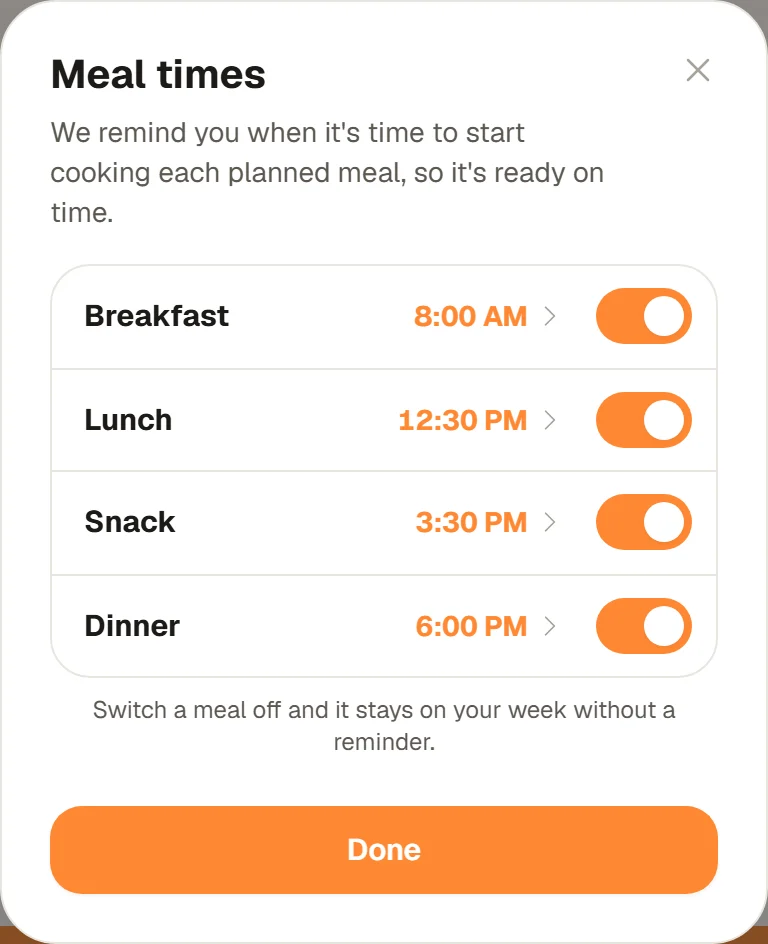
To change them, tap Dinner at 6:00 PM at the top of Meal Plan, under the week's name.Meal times opens with all four meals, each with its time and a switch. Tap a meal to open its time: pick one of the six usual times or use - and + to move it 15 minutes at a time, and the strip underneath shows when the reminder will land. Then tap the button at the bottom, such as Breakfast at 7:00 AM every day (for dinner it says every night). The arrow at the top goes back to all four meals.
- Every planned meal of that kind, from today on, gets its reminder moved.
- Meals you plan later use the new time too.
- Meals with a time of their own for one day keep it.
You can open the same Meal times window from two other places:
- Taste profile: the Meal times row at the top of your taste profile (on the website under Profile and taste).
- By voice or typing: in the box at the bottom of Meal Plan, say or type "breakfast at 7:30", "lunch at noon", "snack at 3" or "dinner at 7". Without AM or PM, the time is read the way the meal is eaten: "breakfast at 7" and "snack at 10" are in the morning, "dinner at 7" is in the evening.
The first time you plan a breakfast, lunch or snack
The first time you add a recipe as a breakfast, a lunch or a snack, CookEase asks once, for example When's breakfast usually?Tap one of the three times and that becomes your usual time for the meal, so its reminders fit your day. Tap Other time to pick any time, or Not now to keep the usual one (8:00 AM for breakfast). It asks once for each meal, and you can change the time whenever you like in Meal times.
Turn a meal's reminders off
In Meal times, each meal has its own switch, and all four start on. Switch Breakfast off, for example, and your breakfasts stay on the week without a reminder. Switch it back on any time.
Give one meal its own time on one day
Late soccer practice on Friday? Tap the reminder time on Friday's dinner (the bell), or tap its ... button, then Dinner time. Pick the time, leave Just Friday selected, and tap Dinner at 8:00 PM. It works the same for any meal: Lunch on Tuesday with Just Tuesday or Every day (or Just today, and Just tonight for tonight's dinner).
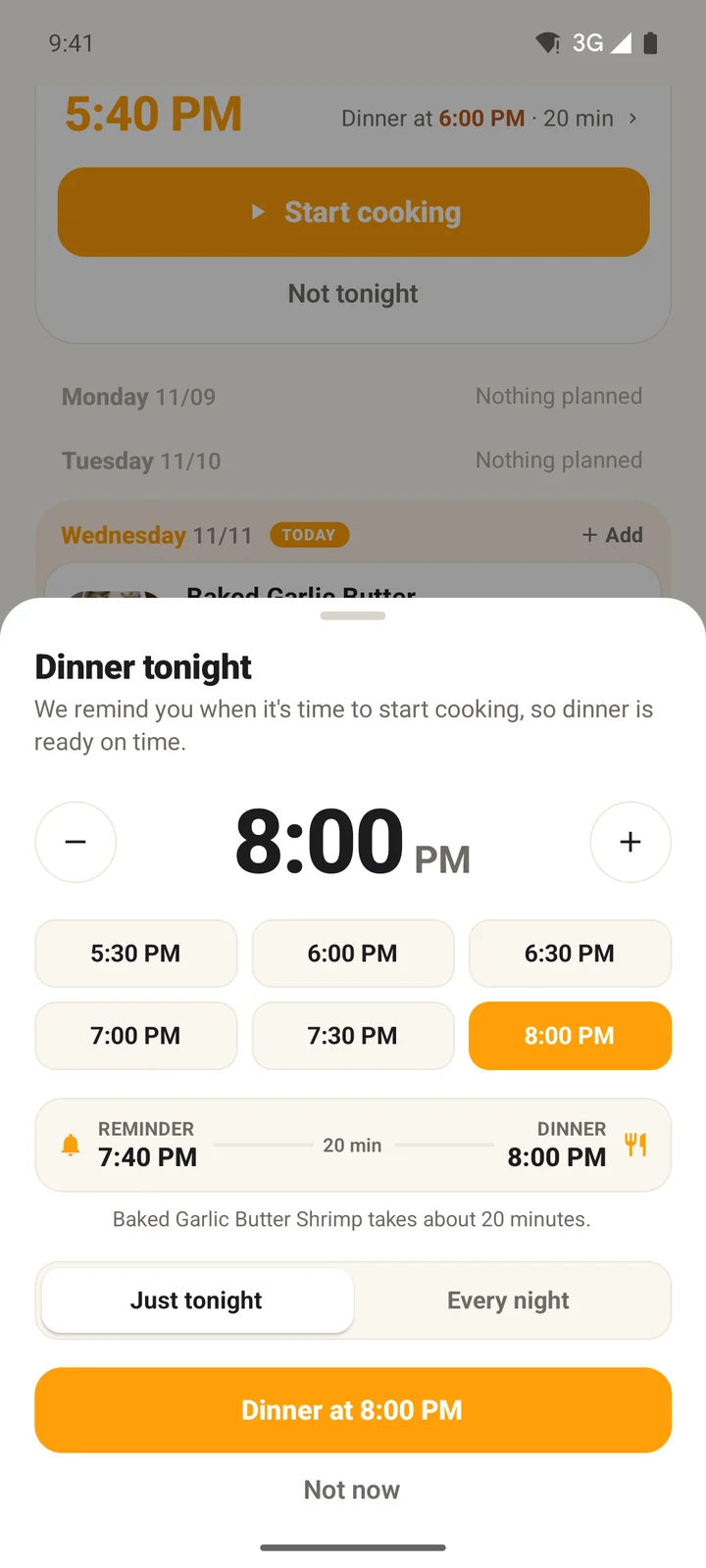
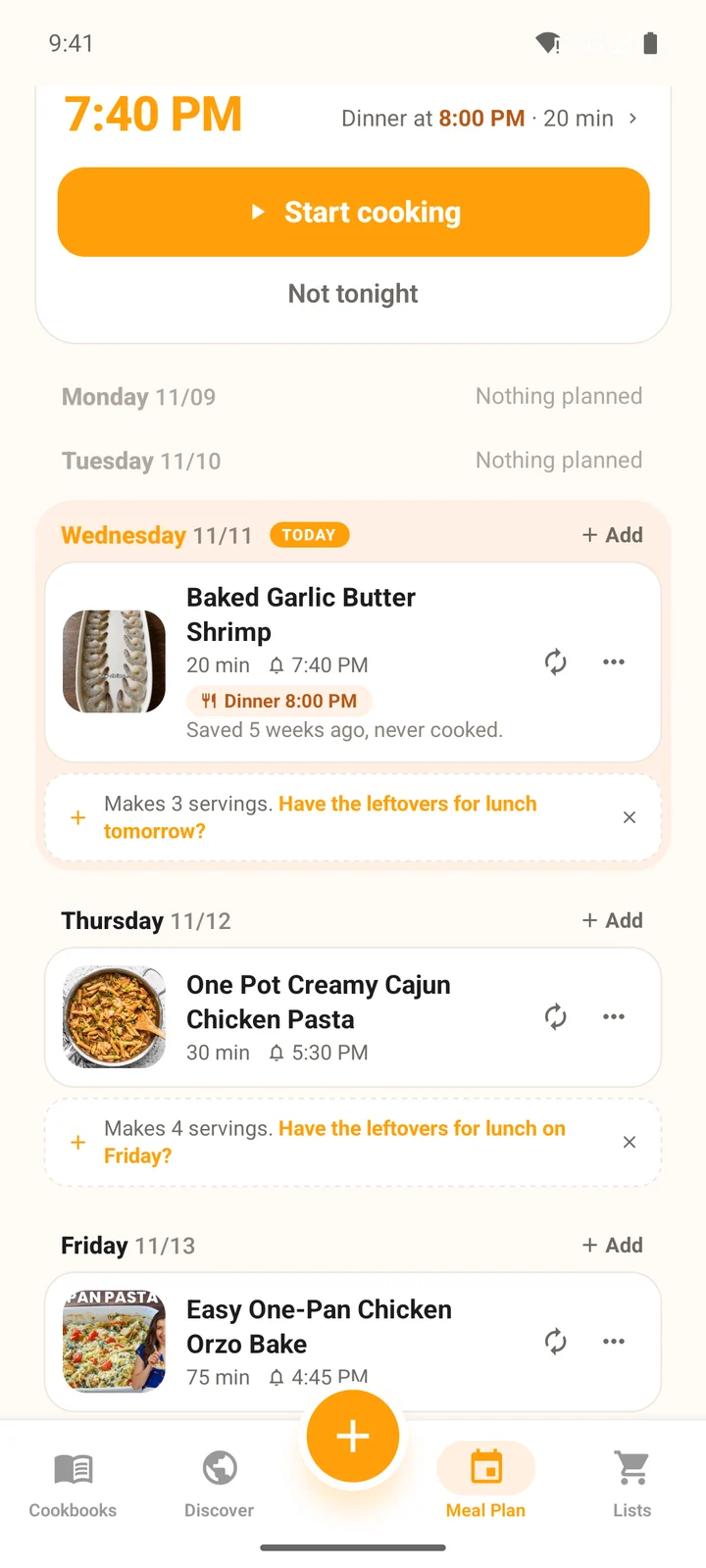
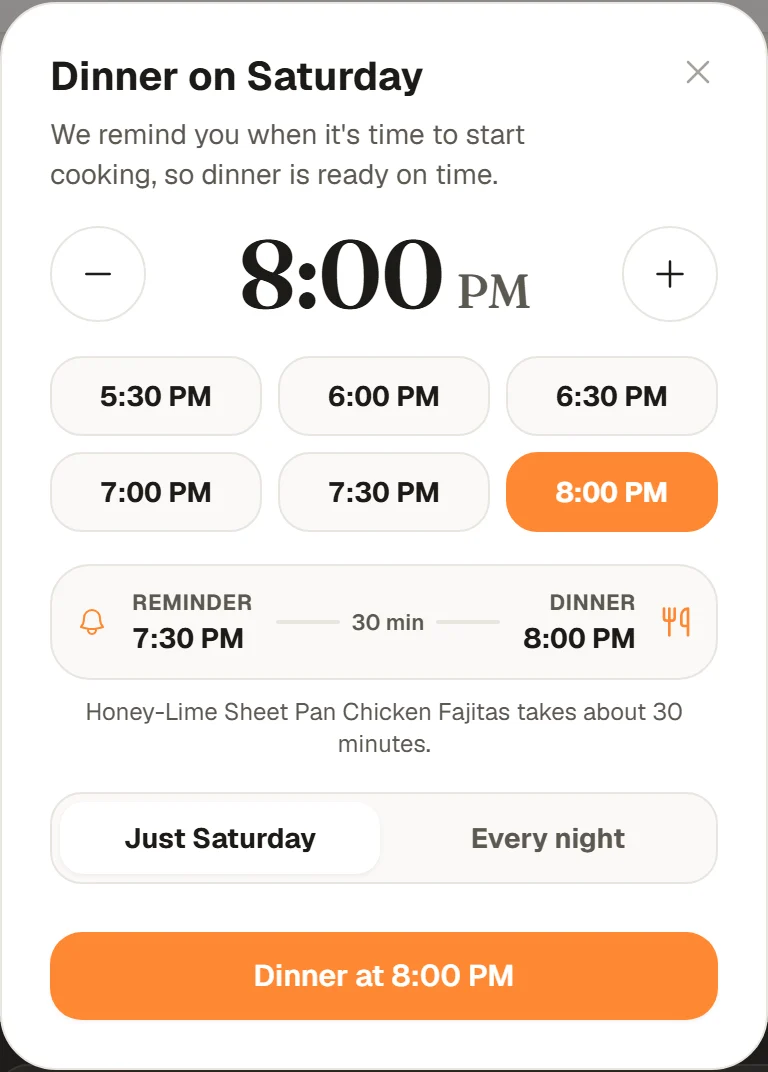
That meal now shows a small tag with its own time, like Dinner 8:00 PM or Lunch 1:00 PM. To undo it, open it again and tap Back to my usual. Choosing Every day (or Every night) instead changes your usual time for that meal. You can say it too: "dinner at 8 on Friday" or "Friday lunch at 12:30".
Right after you add a recipe
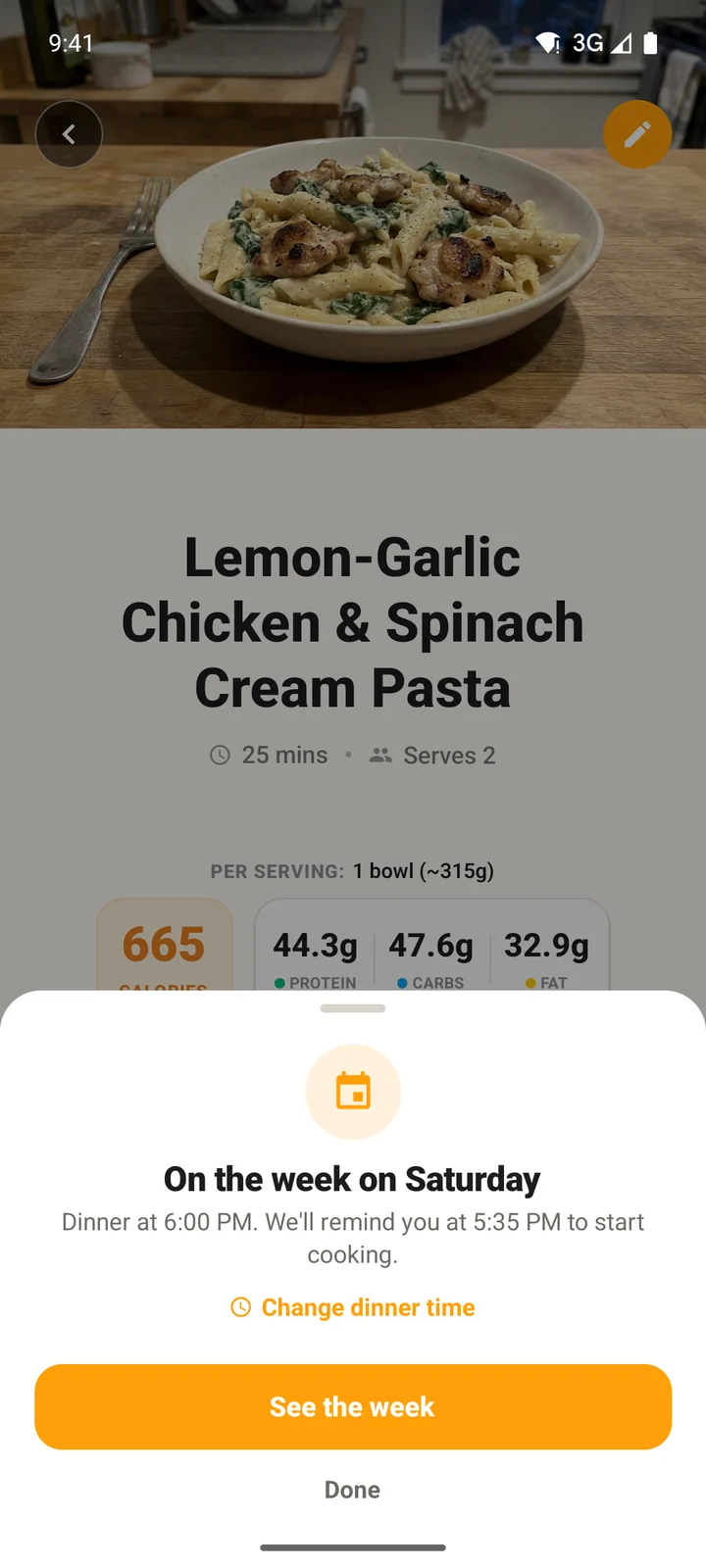
When you add a recipe from its page with Add to meal plan, CookEase tells you when the meal is and when you will be reminded, for example Breakfast at 8:00 AM. We'll remind you at 7:45 AM to start cooking.In the app, tap Change breakfast time (or the meal you picked) right there to give that day its own time.
What the reminder says
Time to start and the recipe's name, then the meal and its time, like Start now and breakfast is ready around 8:00 AM. (for a snack: your snack is ready around). Tap it to open the recipe. It comes as a notification from the iPhone or Android app when notifications are on, and by email otherwise.
In the app, the notification has buttons of its own (press and hold it, or pull it down, to see them):
- Start cooking opens the recipe in the Cooking Assistant, ready at the first step.
- Not tonight, on a dinner reminder, moves that dinner to the next night without one and opens Meal Plan to show you where it went.
Reminders for breakfast, lunch and snacks have Start cooking only. The buttons are in the app's notifications; the email has a link to the recipe. See turning reminders on or off.