
New versions of CookEase bring fixes and new features, and the app lets you know when one is ready. Updating takes a minute and never touches your recipes: they live with your account, not on your phone.
The two update messages
Update available
A sheet that says Update available and A new version of CookEase is ready with improvements and fixes.
Tap Update to go to the store, or Not now to keep cooking. It appears once per new version: after Not now, CookEase stays quiet until the next one comes out.
Update required
A full screen that says Update required and This version of CookEase is no longer supported. Please update to keep cooking.
This appears only when a version is too old to keep working properly. Tap Update CookEase, install the update, and open the app again. Until then you can still see your recipes on the website at cookeaseapp.com.
How to update
- 1
From the message
Tap Update or Update CookEase. The App Store opens on CookEase. Tap Update. - 2
Or from the App Store
Open the App Store, tap your profile picture in the top right, scroll to the list of available updates and tap Update next to CookEase. You can also search for CookEase and tap Update.
Automatic updates: open Settings, then App Store, and turn on App Updates.
- 1
From the message
Tap Update or Update CookEase. Google Play opens on CookEase. Tap Update. - 2
Or from Google Play
Open the Play Store, tap your profile picture, then Manage apps & device, and tap Update next to CookEase. You can also search for CookEase and tap Update.
Automatic updates: on the CookEase page in Google Play, tap the three dots in the top right and turn on Enable auto update.
Check which version you have
Open the More tab and scroll to the bottom. Under Log Out it shows your version, for example Version 1.18.1. It is handy to include when you write to us.
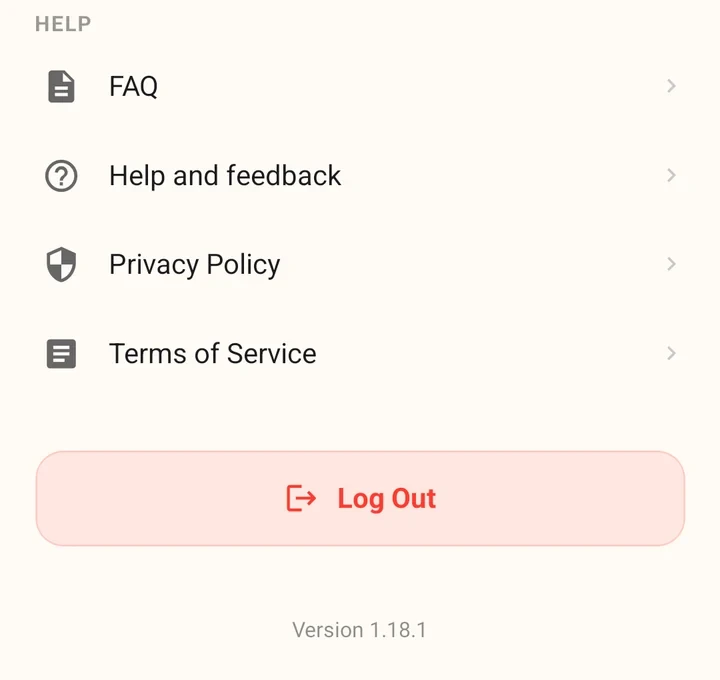
The version number at the bottom of the More tab.
Android early access
CookEase for Android is in early access on Google Play. To join, open cookeaseapp.com/android on your Android phone, signed in to the Google account you use for Google Play, and follow the steps there:
- Join the early access group: tap Join the group. It is free.
- Turn on early access: tap Become a tester. If it says the page is not available yet, wait a few minutes and try again.
- Install CookEase: tap Open Google Play, install, and log in with your CookEase account. Your recipes come with you.
After that, updates arrive through Google Play like any other app, and the update messages above work the same way. See get CookEase on your devices for installing on every device.
Something not working after an update? Tell us through Help and feedback and include your version number.