
Your CookEase cookbook, inside ChatGPT and Claude
Add CookEase to ChatGPT or Claude and ask about your recipes right in the chat. It can find a recipe you saved, double it, put it on your Meal Plan and turn the week into one shopping list. Connecting is free.
The address to add
https://cookeaseapp.com/mcpStep by step: in ChatGPT · in Claude
Things you can ask
“What can I make with chicken and rice from my recipes?”
It looks through the recipes you saved in CookEase and shows the ones that fit.
“Double my chili recipe and put it on Saturday.”
Every amount doubles, including the ones written in the steps, and the chili goes on Saturday's dinner in your Meal Plan.
“Make a shopping list for this week.”
Everything on this week's Meal Plan becomes one shopping list, with amounts added up and sorted by aisle.
“Save this recipe for me: (paste a link)”
It saves the recipe from a recipe website, or from a TikTok, Instagram, YouTube, Facebook or Pinterest video, straight into your cookbook.
“Make my lasagna dairy-free and keep it next to the original.”
You work out the changes together in the chat, then the new version is saved beside your original recipe.
“Give me a few quick vegetarian dinner ideas.”
It finds recipes from home cooks and food creators on CookEase Discover. In ChatGPT, this one works before you connect an account.
“Find me a really good shakshuka recipe and save it to CookEase.”
ChatGPT or Claude looks on the web as it always does, then CookEase saves the recipe it picked into your cookbook, ingredients and steps written out.
“How long does cooked rice last in the fridge?”
The answer comes from USDA FoodKeeper, the same times CookEase's food storage pages use. No account needed.
“I'm out of buttermilk. What can I use?”
Tested swaps with amounts and where each one comes from. No account needed.
“Show me @ronacooks's recipes.”
The recipes a creator keeps on their CookEase page, ready to open, scale or save.
“Send this week's shopping list to Instacart.”
Your list becomes a ready Instacart cart. You pick the store and check out on Instacart yourself.
Recipes, weeks and lists show in the chat as cards with an Open in CookEase button.
What it can do with your cookbook
Your recipes, found and opened
Search what you saved by name, ingredient or cookbook, and open any recipe with its ingredients, steps, times and nutrition.
Any number of servings
Ask for a double batch, half a batch or dinner for six. Amounts in the ingredients and in the steps change together.
Saving recipes
Save from a link, save a recipe you wrote together in the chat, or keep a Discover recipe. Each one lands in your cookbook on the website and in the CookEase app.
Your Meal Plan
See your week, and add, move or take off breakfast, lunch, a snack or dinner on any day.
Shopping lists
Make a list from items or from recipes (scaled to how many you are cooking for), add to one you already have, and check things off.
Your food preferences
It reads your allergies, the foods you avoid and how many people you cook for before it suggests a meal.
Kitchen questions
How long food keeps, what to use instead of a missing ingredient, and scaling or converting any ingredient list to grams or cups, from the same sources as CookEase's free kitchen tools.
Creators' recipes
Ask for a food creator by their handle and get the recipes on their CookEase page.
Groceries from your list
Turn a CookEase shopping list into an Instacart cart in one step. Nothing is bought until you check out on Instacart.
How to add CookEase
It takes about two minutes. Until CookEase is listed in ChatGPT's and Claude's app directories, you add it with its address, https://
Add it in ChatGPT
Open ChatGPT on the web and choose Plugins in the left bar.
Choose Add at the top, then Add custom MCP server.
Name it CookEase and paste the address https://
cookeaseapp.com/mcp. ChatGPT fills in the sign-in settings by itself. Check the box that says you understand, then choose Create as a plugin, then Continue to CookEase.
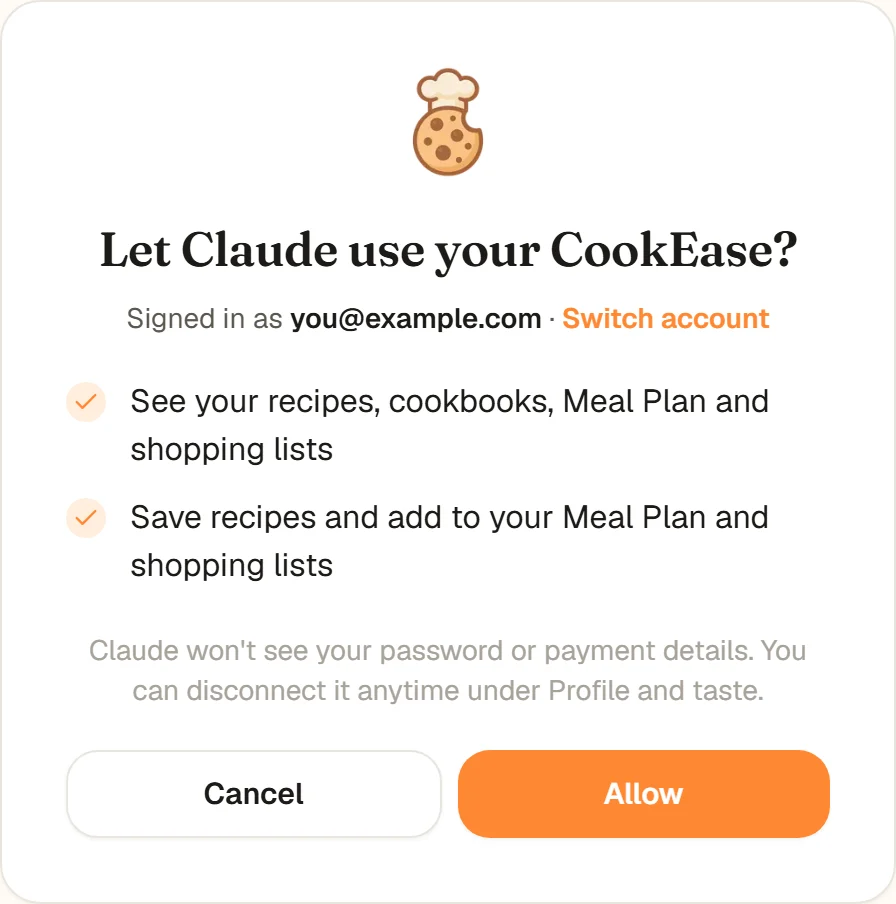
A CookEase page opens. Sign in, or make a free account, and choose Allow. Then ask about your recipes in any chat, for example "Using CookEase, show me my newest recipes."
Add it in Claude
Open Claude on the web or the desktop app and go to Settings, then Connectors.
Choose Add custom connector.
Name it CookEase and paste the address https://
cookeaseapp.com/mcp, then choose Add. Choose Connect next to CookEase. Claude opens a CookEase page: sign in, or make a free account, and choose Allow.
Start a chat and ask about your recipes. CookEase can be switched on or off for a chat from the tools menu.
More detail, with pictures, in the help article.
Your account stays yours
It can see your recipes, cookbooks, Meal Plan, shopping lists and food preferences, and it can save recipes and change your Meal Plan and lists when you ask.
It never sees your password or payment details, and it cannot delete recipes from your cookbook.
Disconnect it anytime in Profile and taste on the CookEase website, under Connected apps. Its access stops at once.
When you send a list to Instacart, only the item names and amounts go to Instacart, and nothing is bought until you check out there.
What ChatGPT or Claude does with your conversation is covered by OpenAI's or Anthropic's own privacy policy.
Our privacy policy has the details.
Questions
- Does it cost anything?
- No. Connecting CookEase is free, and so are finding recipes, scaling them, your Meal Plan and shopping lists. Saving a recipe from the chat uses one of your free saves, the same as saving anywhere else in CookEase: the free plan starts with 5, and CookEase Pro saves are unlimited.
- Do I need a CookEase account?
- Recipe ideas from CookEase Discover, creators' recipes, food storage times, ingredient swaps and converting an ingredient list work without one in ChatGPT. Everything that uses your own cookbook needs a free account, and you can make one on the page that opens when you connect.
- Which assistants can use it?
- ChatGPT (adding your own app works on the Plus plan) and Claude, and other assistants that let you add an app by its web address. Until CookEase is listed in their app directories, add it with the address cookeaseapp.com/mcp.
- What can it see and change?
- Your recipes, cookbooks, Meal Plan, shopping lists and food preferences (allergies, foods you avoid, how many people you cook for). It can save recipes, add to and change your Meal Plan, and make and change shopping lists. It never gets your password or payment details, and it cannot delete a recipe.
- How do I disconnect it?
- On the CookEase website, open the account menu, choose Profile and taste, and find Connected apps. Choose Disconnect next to ChatGPT or Claude. The assistant loses access right away, and you can connect again anytime. You can also remove CookEase in ChatGPT's or Claude's own settings.
- Why could it not save a recipe from a link?
- Some recipe sites ask apps not to read their pages, and CookEase respects that. Copy the recipe from the page, paste it into the chat, and ask it to save the recipe. That works on any site.
- Where do recipes I save from the chat go?
- Into your CookEase cookbook, the same one you see on cookeaseapp.com and in the CookEase app for iPhone and Android. Recipes, weeks and lists also show in the chat as cards with an Open in CookEase button.
- Is this the Cooking Assistant?
- No. The Cooking Assistant is the voice helper inside CookEase's cook mode. This lets ChatGPT or Claude use your CookEase cookbook from their own chat.