A friend shares a casserole in a group, a Reel of five-minute fudge plays in your feed, a post promises the recipe "in the comments." You tap Save, and weeks later you cannot find it, or it is simply gone.
Facebook is where a lot of family-style cooking gets shared, but its Save button was built for "look at this later", not "keep this recipe for years." This guide shows how Save works for each kind of post, where your saves actually live, why they disappear, and how to get a recipe out of Facebook so it is still there next Thanksgiving. If you save from Instagram too, our Instagram guide covers its quirks.
Where is the recipe in this Facebook post?
On Facebook a recipe can live in five different places, and each one needs a slightly different move. Pick yours to see what Facebook's own Save does for it and the way to keep it for good.
Where is the recipe you want to keep?
Facebook's Save button: Saves the video, as a pointer. Gone if the creator deletes it.
To keep it for good
Share it to a recipe app that watches the video
Many Facebook recipe videos say the amounts out loud or flash them on screen, with little or nothing in the post text. A recipe app that reads the video turns that into a written list you can cook from. Otherwise, pause and write it down.
How to save a recipe on Facebook with the Save button
Every post, video and Reel on Facebook has a Save option. It costs nothing, takes two taps, and it is the right first move even if you plan to copy the recipe somewhere else later.
- 1
Tap the three dots on the post
They sit in the top corner of a post. On a Reel or video, they sit beside the video. - 2
Tap Save
The option reads Save post, Save video, Save reel or Save link, depending on what you are looking at. - 3
Add it to a collection (optional)
Facebook may offer to put it in a collection right away. Pick one like "Dinners" or create a new one.
- 1
Click the three dots on the post
Facebook calls this the Options menu. - 2
Click Save
For a Reel or video, click Save reel or Save video while it plays. - 3
Open your saves any time
Go to facebook.com/saved.
Where do saved posts go on Facebook?
This is the question people search most after they hit Save, because the Saved list is not on the home screen. It lives in the menu, and Reels have a second home on your profile.
- 1
In the Facebook app
Tap Menu (your profile picture or the three lines), then Saved. If you do not see it, tap See more. - 2
On a computer
Go to facebook.com/saved, or click See more in the left menu, then Saved. Use the filter at the top to show only Reels, photos or links. - 3
Saved Reels on your profile
On a computer, click your name, then Reels, then Saved Reels.
Use collections, or your Saved list turns into a junk drawer
Saved collects everything: recipes, Marketplace couches, articles you meant to read. A collection is a named group of saved items, and you can save into one from your feed and from Reels.
One long Saved list
A few collections by meal
Why saved Facebook posts disappear (and why you can't search them)
A Facebook save is a pointer to someone else's post, not a copy of it. Facebook keeps no copy of the recipe for you, so the save simply stops opening when any of these happens, and you get no warning:
- The person deleted the post, or Facebook removed it.
- They changed who can see it, for example from Public to Friends.
- You left the group it was posted in, and the group is private.
- The account was deactivated or deleted.
- You saved it on another account. Saves belong to the account that made them.
The other frustration is search. You can filter Saved by type and open a collection, but you cannot type "enchiladas" and find the saved post that mentions them. Facebook's download your information tool includes your saved items, but it lists what you saved rather than reliably bringing the recipe text along, so it is no backup either.
If you would be upset to lose it, don't leave it only in Facebook's Saved.
"Recipe in the comments": what it means and how to save it
Many recipe posts end with "recipe in the comments" or "link in the first comment." The recipe really is there, usually in a comment from the creator near the top, with either the full recipe as text or a link to their website.
Why put it there? Facebook's feed runs overwhelmingly on posts without links, and Facebook has tested capping how many links some creators and Pages can put in their posts while leaving links in comments alone, TechCrunch reported.
Source: Meta's Q3 2025 transparency report, as reported by TechCrunch (December 2025)
The catch for you: Save keeps the post, not the comment. Here is how to keep the actual recipe.
- 1
Open the comments
Tap the comment count under the post. If the comments are sorted by "Most relevant", the creator's own comment is usually near the top. - 2
If it is a link, open it
That page is the real recipe, and it will outlive the post. Save that page: bookmark it, print it, or paste its link into a recipe app. - 3
If it is text, copy it
Press and hold the comment to copy its text, then paste it into your notes or a recipe app.
How to save recipes from Facebook groups
Recipe groups are some of the best places on Facebook to find tested home cooking, and the most fragile place to leave it. Saving a group post works the same way as any other post, but two things are different.
- Private groups only open for members. If you leave the group, or the group is archived, your saves from it stop opening. Anything that needs to open the post from outside Facebook, including recipe apps that save from a link, usually cannot see inside a private group either.
- Group recipes tend to be written out. Members often type the whole recipe into the post, which makes copying the text the easiest and most reliable way to keep it.
How to keep Facebook recipes for good
The fix for disappearing saves is the same everywhere: keep your own copy. You have three options, from free and manual to one tap.
- Copy the text into your notes. Free and permanent. Give each note the dish name so you can search for it, and paste the post's link at the bottom. It does nothing for videos where the recipe is only said out loud.
- Screenshot it. Fast, but screenshots pile up in your camera roll with no names. Your phone can pull the text out of a screenshot later (Live Text on iPhone, Google Lens on Android).
- Share it to a recipe app. The app turns the post into a written recipe in your own account, with a title, amounts and steps, and it stays there whatever happens to the post.
Saving a Facebook recipe to CookEase
CookEase reads the post text and watches the video, so it works on Reels where the recipe is only spoken or shown on screen. A post with several recipes in it is saved as separate recipes, and a save that fails never uses up one of your saves.
- 1
Tap Share on the post or Reel
If Facebook shows its own share menu first, look for More (or the three dots) to open your phone's share menu. - 2
Choose CookEase
The recipe starts saving straight away, and a recipe card fills in as CookEase reads it. - 3
File it in a cookbook
Pick a cookbook like "Weeknight dinners", or tap Done.
- 1
Copy the post's link
From your browser's address bar, or Share, then Copy link in the app. - 2
Paste it into CookEase
Paste it into the field at the top of cookeaseapp.com, or click Save a recipe and paste it there.
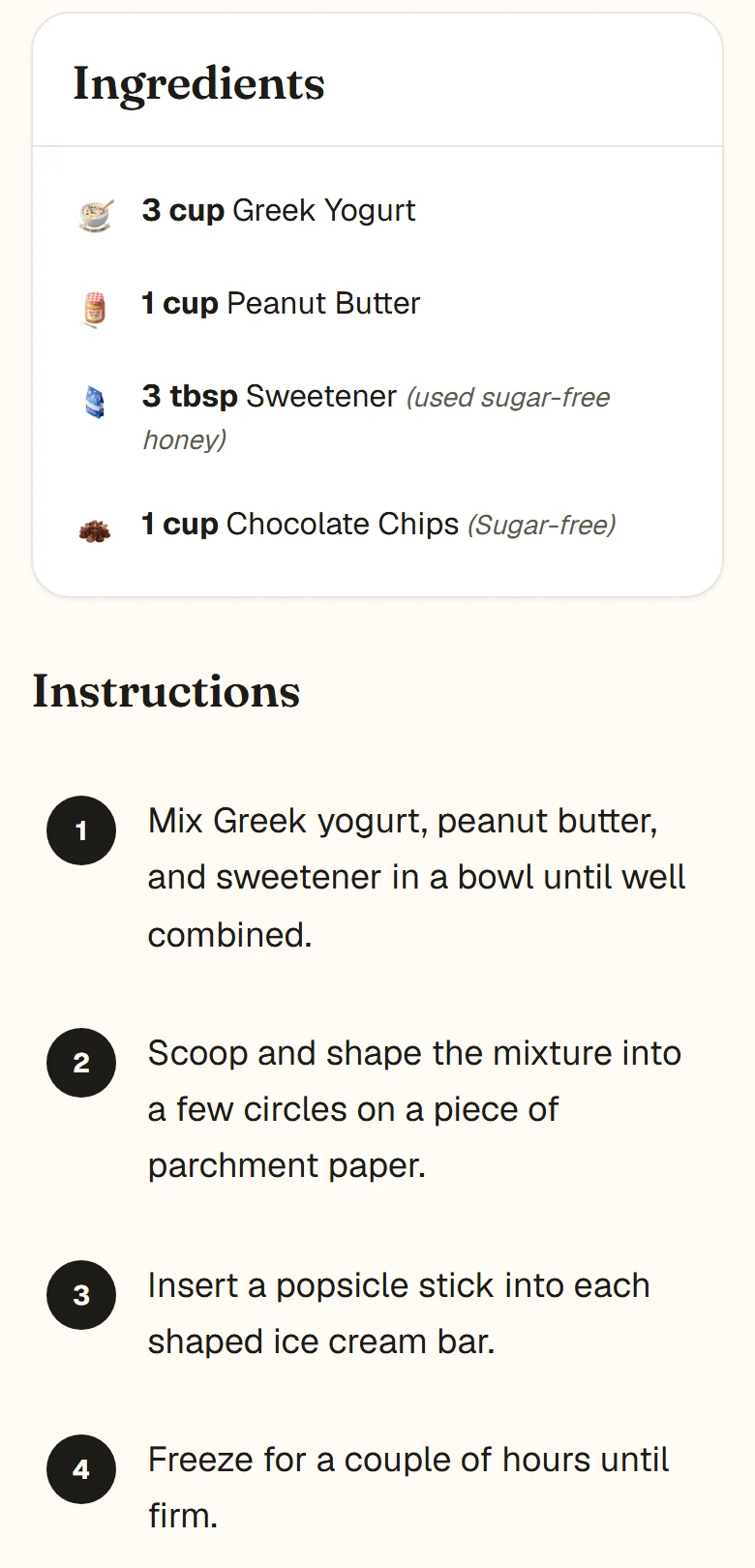
A no-churn ice cream bar recipe saved from a Facebook Reel, written out as ingredients and steps.

Every saved recipe keeps a View Original button back to the Facebook post.
Private group posts are the one case where sharing will not work, because CookEase cannot open them either. Copy the post text instead and paste it into CookEase. The help guide for saving from social apps shows the share menu step by step, and Discover has recipes other cooks have already saved.
Keep the recipes you find on Facebook.
Share any Facebook post or Reel to CookEase and get the full recipe, with amounts and steps, in your own cookbook. It stays there even if the post disappears.